
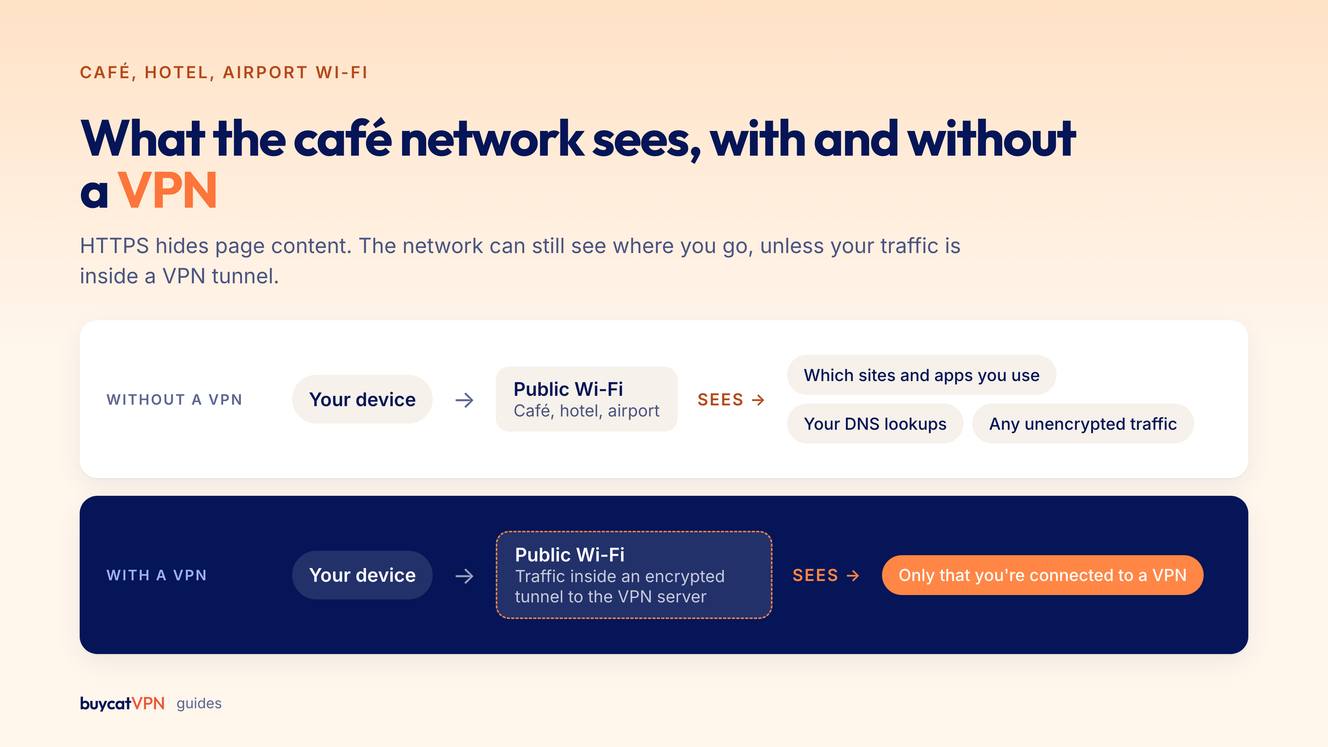
Yes, use a VPN on public Wi-Fi you don't control. HTTPS already encrypts page content and passwords, but a café, hotel or airport network can still see which sites and apps you use, tamper with unencrypted traffic and run fake hotspots. A VPN encrypts everything between your device and the VPN server, so the network only sees that you're connected to a VPN.
 Team BoycatUpdated Oct 22, 2026
BuycatVPN
A no-logs VPN for iOS, Android, Mac, Windows and Linux.
Use a VPN on any public Wi-Fi you don't control. HTTPS already protects your passwords and page content, but the network can still see which sites you visit, and fake hotspots can send you to look-alike pages. A VPN closes those gaps, and the 30-second checklist below covers the rest.
Safer than it used to be, because most sites now use HTTPS. When a site uses HTTPS (the padlock), the page content, your passwords and form data are encrypted between your browser and the site.
Google reports that the large majority of pages loaded in Chrome now use HTTPS (Google Transparency Report). In 2023, Google said only 5 to 10% of Chrome traffic was still plain HTTP (9to5Google).
So on café Wi-Fi, a snoop generally can't read your banking password. "Never use public Wi-Fi" is outdated advice. "It's fine now" isn't quite right either.
The network can see where you go, even when it can't see what you do there.
A VPN creates an encrypted tunnel from your device to the VPN server, so the local network sees the tunnel and nothing inside it. On a café network that means:
A VPN doesn't protect you from phishing emails, malware you install, or tracking by accounts you're logged into.
You're also now trusting the VPN provider instead of the café, so pick one with a clear logging policy and a known owner. See how to check if a VPN keeps logs and who owns your VPN.
Six habits cover most of the risk on a shared network.
Turn on auto-connect, so the VPN starts whenever you join a Wi-Fi network you haven't marked as trusted. Forgetting to turn the VPN on is the most common mistake.
Every network you don't control. Cafés, hotels, airports and campuses are a yes; home Wi-Fi and mobile data are optional.
| Network | Use a VPN? | Why |
|---|---|---|
| Café, restaurant, mall | Yes | Open or shared password, anyone can join |
| Hotel | Yes | Shared by hundreds of guests, common phishing portals |
| Airport, train, plane | Yes | Easy to spoof, high-value targets |
| Campus, coworking, conference | Yes | Large shared networks, often monitored |
| Friend's home | Optional | Lower risk, but you don't control it |
| Your home Wi-Fi (WPA2/WPA3) | Optional | Use it to hide activity from your ISP or change location |
| Mobile data |
For trips, the VPN for travel guide covers banking and setup before you fly.
Usually, yes. Sharing your phone's mobile data as a hotspot is safer because you control the network and it's password-protected.
Use a strong hotspot password and turn the hotspot off when you're done. Your mobile carrier still sees your traffic, so a VPN is still worth running if you want privacy from the carrier too.
A bit, usually, and public Wi-Fi is often the bottleneck anyway. Choose a nearby VPN location and the WireGuard protocol for the best speed. More in does a VPN slow down your internet.
Look for four things: auto-connect on untrusted networks, WireGuard, apps on every device you carry, and a clear no-logs policy.
Buycat VPN covers 3, 5 or 10 devices across iPhone, Android, Mac, Windows and Linux and connects in one tap. Web plans start at $37.69 a year with a 30-day money-back guarantee.
On HTTPS sites, your passwords and page content are encrypted. The network can still see which sites you visit, and fake hotspots can redirect you. A VPN closes those gaps.
The network can usually see which sites and apps you connect to, but not the content of HTTPS pages. With a VPN on, it only sees that you're connected to a VPN.
Yes. Hotel networks are shared by many guests and often use login portals that are easy to fake.
A VPN protects your traffic on the network. It doesn't protect against phishing, malware or weak passwords.
Yes, on any Wi-Fi you don't control. Turn on auto-connect in the VPN app so you don't have to remember.
Short, practical guides on staying private online, plus Buycat VPN news and offers. Unsubscribe any time.
BuycatVPN
A no-logs VPN built around your privacy.
AES-256 encryption on iOS, Android, Mac, Windows and Linux. 30-day money-back guarantee on your first web purchase.
Get BuycatVPN| Optional |
| Harder to intercept; carrier still sees your traffic |

