
Yes, a VPN usually slows your internet a little, because traffic is encrypted and takes a detour through the VPN server. Distance to the server matters most, then protocol (WireGuard is typically fastest), server load and your device. On a nearby server with a modern protocol, most people won't notice in everyday browsing. A VPN can be faster when a provider throttles specific traffic like video.
 Team BoycatUpdated Oct 22, 2026
BuycatVPN
A no-logs VPN for iOS, Android, Mac, Windows and Linux.
Yes, a VPN usually slows your internet a little, and less than you'd think if it's set up right. Distance to the VPN server matters most, then protocol and server load.
Your traffic is encrypted and takes a detour through the VPN server.
There's no single number. As a rule of thumb:
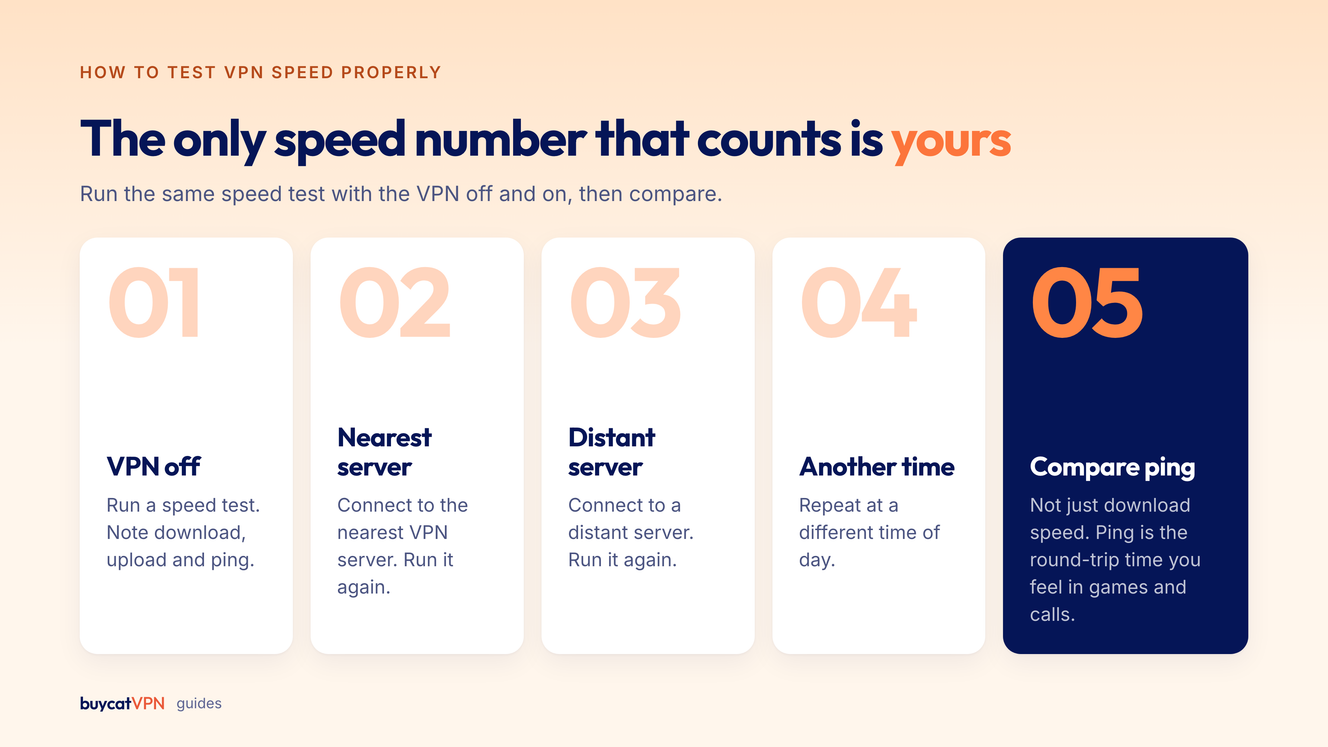
Measure your own. That's the only number that counts.
Run the same speed test with the VPN off and on, then compare. Ping (latency) is the round-trip time you feel in games and calls.
Sometimes. If your provider throttles (deliberately slows) certain traffic, a VPN hides what that traffic is.
A Northeastern University-led study using the Wehe app analyzed over a million tests and found US wireless carriers routinely throttled video streaming services (Northeastern, paper). In that situation, a VPN can restore normal speeds for the throttled app.
A VPN can also help when your provider's routing to a site is poor. These are exceptions; expect a small loss, not a gain.
Start with the server and the protocol.
WireGuard, in most cases. OpenVPN TCP is the slowest.
| Protocol | Speed | When to use it |
|---|---|---|
| WireGuard | Fastest in most cases | Default for everyday use |
| IKEv2 | Fast, reconnects well on mobile | Phones switching between Wi-Fi and mobile data |
| OpenVPN UDP | Good | When WireGuard is blocked |
| OpenVPN TCP | Slowest | Strict networks that block everything else |
Mobile data speed changes with signal strength, so VPN tests there are noisy. Run several and compare averages.
If your connection drops when moving between Wi-Fi and mobile data, try IKEv2, which is designed to handle network changes. On congested public Wi-Fi, the network is usually the bottleneck, and the VPN's share of the slowdown is small. More in the public Wi-Fi guide.
For gaming and calls, ping matters most.
Abroad, the VPN for travel guide covers which server to pick.
Look for WireGuard support, servers close to where you live and travel, automatic fastest-server selection, and split tunneling.
Buycat VPN picks the fastest location when you tap connect, supports WireGuard, IKEv2 and OpenVPN, and includes split tunneling on Plus and Pro. Test it on your own connection inside the 30-day money-back window.
Usually a little. Distance to the VPN server matters most, and a nearby server with WireGuard keeps the loss small.
Common causes are a distant or crowded server, an older protocol, TCP mode, or slow Wi-Fi. Switch to a nearby server and WireGuard first.
WireGuard is generally the fastest modern VPN protocol, with lower overhead than OpenVPN and IKEv2.
Only in specific cases, like when your internet provider throttles a particular service. Most of the time, expect a small slowdown.
Yes, a VPN adds the trip to the VPN server. Use a server near you or near the game server, or split-tunnel the game.
Short, practical guides on staying private online, plus Buycat VPN news and offers. Unsubscribe any time.
Related guides
BuycatVPN
A no-logs VPN built around your privacy.
AES-256 encryption on iOS, Android, Mac, Windows and Linux. 30-day money-back guarantee on your first web purchase.
Get BuycatVPN
